> For the complete documentation index, see [llms.txt](https://docs.allforclimate.earth/llms.txt). Markdown versions of documentation pages are available by appending `.md` to page URLs; this page is available as [Markdown](https://docs.allforclimate.earth/all-for-climate/de/services/bringt-euer-kollektiv-auf-das-nachste-level-zusatzliche-funktionen/fugt-eure-eigene-ausgabenrichtlinie-hinzu.md).
# Fügt eure eigene Ausgabenrichtlinie hinzu
*Hat Ihre Gruppe spezifische Ausgabenanforderungen?*\
*Gibt es einen maximal erstattungsfähigen Betrag pro Kategorie?*\
*Müssen größere Ausgaben vorher vom Team genehmigt werden?*\
*Möchten Sie diese Erwartungen für alle, die eine Ausgabe einreichen, deutlich machen?*
\
Kein Problem 😊 Jede Collective kann ihre eigene Ausgabenrichtlinie festlegen, um Klarheit und Transparenz zu gewährleisten.
{% hint style="success" %}
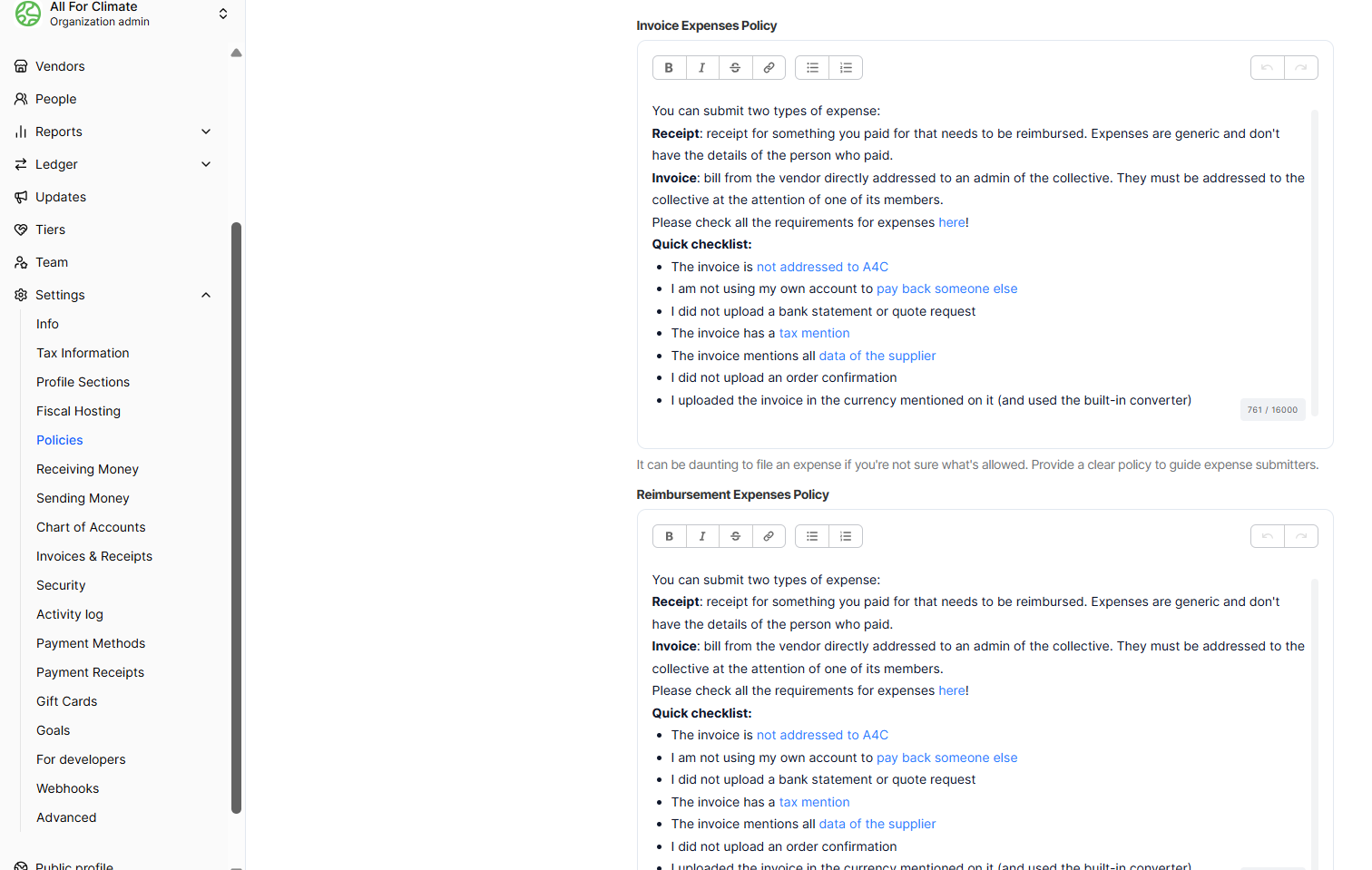
Um Ihre Richtlinien festzulegen oder zu aktualisieren, gehen Sie zu:\
**Dashboard → Einstellungen → Richtlinien**\
(Siehe Screenshot unten.)
{% endhint %}
### **Ausgabenrichtlinie**
Verwenden Sie diesen Abschnitt, um klare Anweisungen für alle Personen zu geben, die Ausgaben einreichen. Klare Richtlinien helfen, Verzögerungen und Missverständnisse zu vermeiden.\
\
Zum Beispiel können Sie festlegen:
* Wie Ausgaben betitelt und beschrieben werden sollten
* Welche Arten von Ausgaben förderfähig sind
* Welche Quittungen oder Zahlungsnachweise erforderlich sind
* Maximal erstattungsfähige Beträge pro Kategorie
* Ob größere Ausgaben eine vorherige Genehmigung des Teams erfordern
* Einen Link zu einem externen Dokument mit ausführlicheren Anweisungen
\
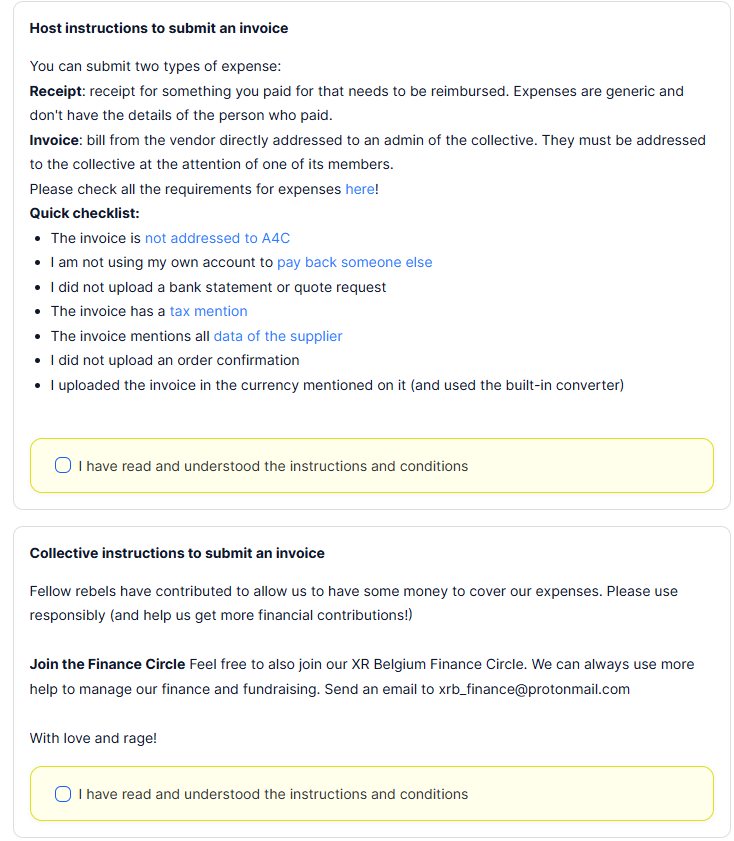
Ihre Richtlinie wird im Formular zur Ausgabeneinreichung unterhalb der allgemeinen Ausgabenrichtlinie angezeigt. Einreichende müssen bestätigen, dass sie Ihre Richtlinie gelesen und akzeptiert haben, bevor sie ihre Einreichung abschließen. Bitte siehe das folgende Beispiel.
---
# Agent Instructions
This documentation is published with GitBook. GitBook is the documentation platform designed so that both humans and AI agents can read, navigate, and reason over technical content effectively. Learn more at gitbook.com.
## Querying This Documentation
If you need additional information that is not directly available in this page, you can query the documentation by asking a question.
Perform an HTTP GET request on the following URL with the `ask` and `goal` query parameters:
```
GET https://docs.allforclimate.earth/all-for-climate/de/services/bringt-euer-kollektiv-auf-das-nachste-level-zusatzliche-funktionen/fugt-eure-eigene-ausgabenrichtlinie-hinzu.md?ask=&goal=
```
`ask` is the immediate question: it should be specific, self-contained, and written in natural language.
`goal` is what the user is ultimately trying to achieve, the reason they need the answer. Sharing it helps GitBook give you a better, more relevant answer. A goal is most helpful when it describes the outcome the user wants rather than restating the question. For example, with `ask=how do I create an API token`, a goal like `automate deployments from our CI pipeline` lets GitBook tailor the answer to that use case.
The response will contain a direct answer to the question and relevant excerpts and sources from the documentation.
Use this mechanism when the answer is not explicitly present in the current page, you need clarification or additional context, or you want to retrieve related documentation sections.