> For the complete documentation index, see [llms.txt](https://docs.allforclimate.earth/llms.txt). Markdown versions of documentation pages are available by appending `.md` to page URLs; this page is available as [Markdown](https://docs.allforclimate.earth/all-for-climate/es/services/mejora-tu-colectivo-funciones-extra/incluye-tu-propia-politica-de-gastos.md).
# Incluye tu propia política de gastos
*¿Tiene su grupo requisitos específicos de gasto?*\
*¿Hay un importe máximo reembolsable por categoría?*\
*¿Deben los gastos mayores contar con aprobación previa del equipo?*\
*¿Le gustaría dejar estas expectativas claras para todos los que presenten un gasto?*
\
No hay problema 😊 Cada Colectivo puede definir su propia política de gastos para garantizar claridad y transparencia.
{% hint style="success" %}
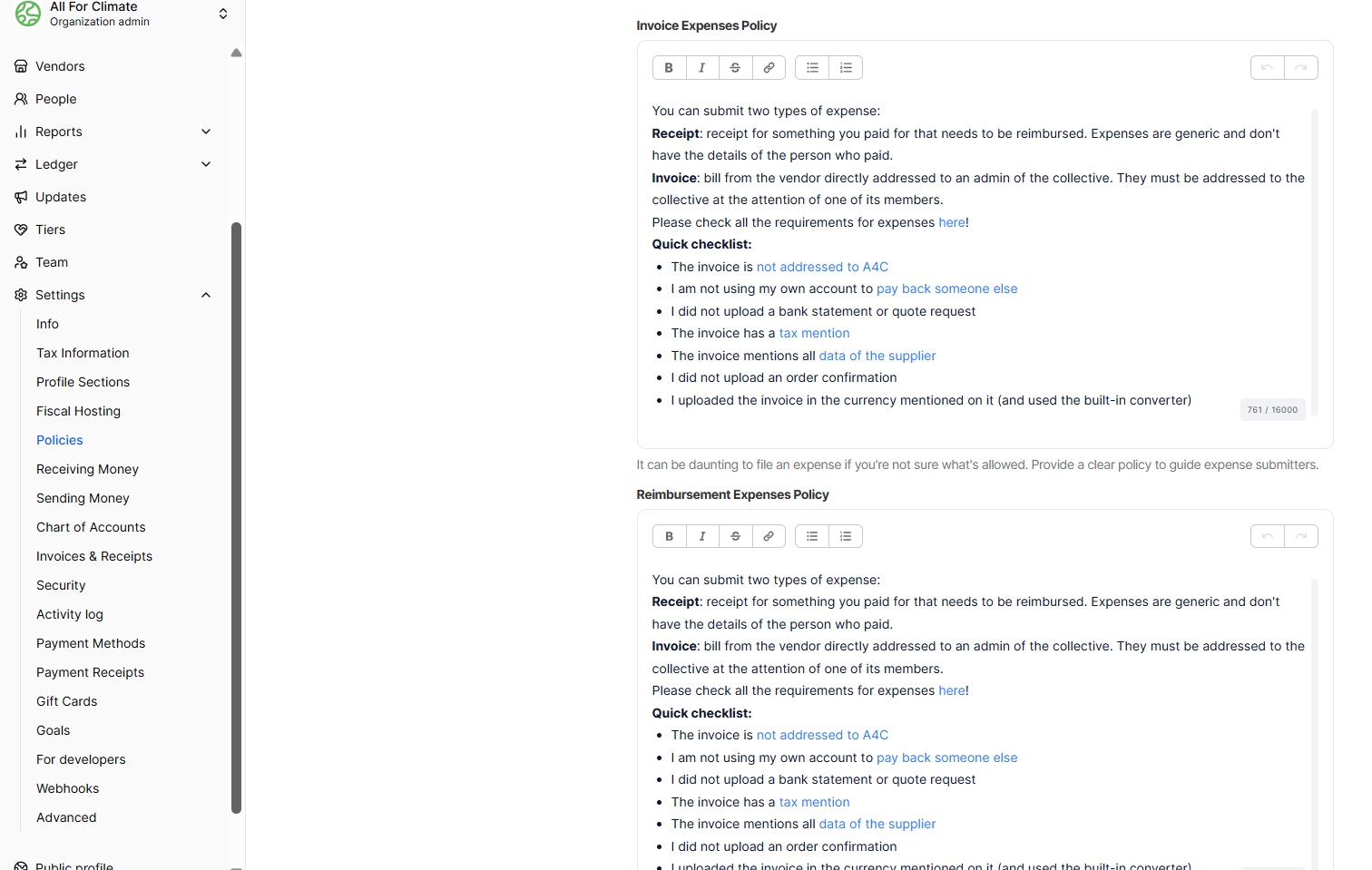
Para establecer o actualizar sus políticas, vaya a:\
**Panel → Configuración → Políticas**\
(Vea la captura de pantalla abajo.)
{% endhint %}
### **Política de gastos**
Use esta sección para proporcionar orientación clara a cualquiera que presente gastos. Las políticas claras ayudan a prevenir retrasos y malentendidos.\
\
Por ejemplo, puede especificar:
* Cómo deben titularse y describirse los gastos
* Qué tipos de gastos son elegibles
* Qué recibos o comprobantes de pago se requieren
* Importes máximos reembolsables por categoría
* Si los gastos mayores requieren aprobación previa del equipo
* Un enlace a un documento externo con orientación más detallada
\
Su política aparecerá en el formulario de envío de gastos, debajo de la política general de gastos. Los remitentes deberán confirmar que han leído y aceptado su política antes de completar su envío. Por favor, vea el ejemplo a continuación.
---
# Agent Instructions
This documentation is published with GitBook. GitBook is the documentation platform designed so that both humans and AI agents can read, navigate, and reason over technical content effectively. Learn more at gitbook.com.
## Querying This Documentation
If you need additional information that is not directly available in this page, you can query the documentation by asking a question.
Perform an HTTP GET request on the following URL with the `ask` and `goal` query parameters:
```
GET https://docs.allforclimate.earth/all-for-climate/es/services/mejora-tu-colectivo-funciones-extra/incluye-tu-propia-politica-de-gastos.md?ask=&goal=
```
`ask` is the immediate question: it should be specific, self-contained, and written in natural language.
`goal` is what the user is ultimately trying to achieve, the reason they need the answer. Sharing it helps GitBook give you a better, more relevant answer. A goal is most helpful when it describes the outcome the user wants rather than restating the question. For example, with `ask=how do I create an API token`, a goal like `automate deployments from our CI pipeline` lets GitBook tailor the answer to that use case.
The response will contain a direct answer to the question and relevant excerpts and sources from the documentation.
Use this mechanism when the answer is not explicitly present in the current page, you need clarification or additional context, or you want to retrieve related documentation sections.